
Vendor bank-account fraud:
how it happens, how to stop it.
Reported AU losses last year reached AUD 84 million, with an average loss of AUD 55,000 per incident and a single documented case of AUD 813,000. Most attacks succeed through one email and one accepted change. This guide walks you through the attack pattern, the failure modes, and the six controls that close the gap.
This guide is one applied example of the four-eyes principle. Vendor bank-account changes are a workflow where one signature is the wrong control; the rule itself applies wherever you nominate it.
Vendor bank-account fraud is a form of business email compromise (BEC) where an attacker, posing as a supplier, asks a finance team to update the bank account on file so the next payment lands in the attacker's account. It applies whenever a supplier's payment details can be changed by a single user from a single email, with no second approver. Under the AU Privacy Act 2024 (penalties up to AUD 50 million) and the NZ Privacy Act 2020 IPP 3A from 1 May 2026, finance teams have to show the controls that protected the change. In Microsoft Dynamics 365 Business Central, role permissions restrict who can edit the Vendor Bank Account table, but the platform does not require a second approver. To close that gap, four-eyes is applied to the vendor bank-account change workflow: when the requestor is also configured as an approver, the engine forces a second authorised approver, and records the approver, the timestamp, and the original and proposed values. This produces an audit trail that satisfies the OAIC, the NZ Privacy Commissioner, and the external auditor. Elevate Approvals enforces four-eyes on the vendor bank-account change workflow by default.
Five steps from a spoofed email to a drained account.
Reconnaissance
The attacker watches the supplier and the buyer for weeks. They harvest LinkedIn posts, out-of-office replies, and any invoice or remittance attached to a public press release. The objective is one named person on each side and the cadence of the trading relationship between them.
Account or domain takeover
The attacker either compromises the supplier mailbox directly through a credential phish, or registers a look-alike domain. The display name on the inbound email reads as the real account manager. The reply-to header points somewhere else, and most finance inboxes do not show that header by default.
The remittance request
A short, plausible message arrives. Quiet voice, no urgency, no typos. "Please update our bank details for future remittances." A new bank account is supplied, often in the same country to avoid an obvious cross-border alert. Sometimes a forged letterhead is attached.
The internal change
A finance assistant updates the vendor record. The change is logged in the ERP audit trail as a single edit by the user who saved it. No second approver is required, no callback is made, and nothing links the change to the email that requested it.
The drained payment run
The next scheduled payment run pays the next legitimate invoice into the new account. Funds clear within hours. By the time the real supplier rings asking why their last invoice has not been paid, the money has been moved on through three accounts and is no longer recoverable.
Four failure modes that share one root cause.
The control should not depend on a finance assistant catching a well-crafted email. It has to sit in the system that stores the bank account, not in the inbox the attacker is impersonating.
Email as the audit trail
The change request lives in an inbox. The change itself lives in the ERP. Nothing connects the two. When an auditor asks who authorised the new bank account, the trail goes cold at "I think it came from an email".
Single-approver bias
Most ERPs let one user save a vendor bank account change with one click. Standard role permissions stop the wrong person from making the change, but they do not require a second person to confirm it.
Social-engineering trust
The email reads like every other email from that supplier. The finance assistant is not negligent; they are pattern-matching. The control has to sit outside the trust relationship the attacker is exploiting.
Inbox is not the ERP
The supplier emails finance. Finance emails the system administrator. The system administrator updates the record. Three handoffs, three sources of truth, and the originating request never touches the system that stores the bank account.
Layered controls. None of them require an inbox.
Four-eyes on the vendor bank-account change workflow
Apply four-eyes to the workflow that updates a vendor bank account. The rule is workflow-level, not field-level: when the requestor is also configured as an approver on that workflow, the engine excludes them and routes to a second authorised approver. The change never reaches the production record until that second approver signs, with the original and proposed values visible alongside the decision.
See how Elevate Approvals enforces four-eyes →Out-of-band callback verification
Verify the change with a phone call to a number you already hold for the supplier. Not the number in the email signature on the change request, and not a number sent in the same thread. Document the callback: who you called, what number, who answered, what they confirmed.
Named-supplier verification
Capture bank details directly from the supplier through a secure form, not from internal email forwards. The supplier completes their own bank details once. The audit trail shows the supplier as the named source, not a finance assistant guessing from a PDF.
Change audit trail
Every change to a vendor record is time-stamped, attributed to a named user, and linked to the request that initiated it. The trail is immutable. An auditor can answer "who, what, when, and why" for any historical bank account change without leaving the platform.
Segregation of duties on supplier records
The user who creates a supplier is not the user who approves a bank account change on that supplier. The user who approves a payment run is not the user who edited the bank fields. Roles are configured so that no single person can move a record from open to paid on their own.
Alerting on bypass detection
If a control is bypassed, an alert fires. If a vendor record is created and saved without going through the workflow, finance management sees it. Silent bypass is the quietest failure mode; alerting is what stops a once-off override from becoming a habit.
What the controls look like in your ERP.
Two short scenarios. The same control pattern, expressed once for any ERP and once for the native Microsoft Dynamics 365 Business Central integration.
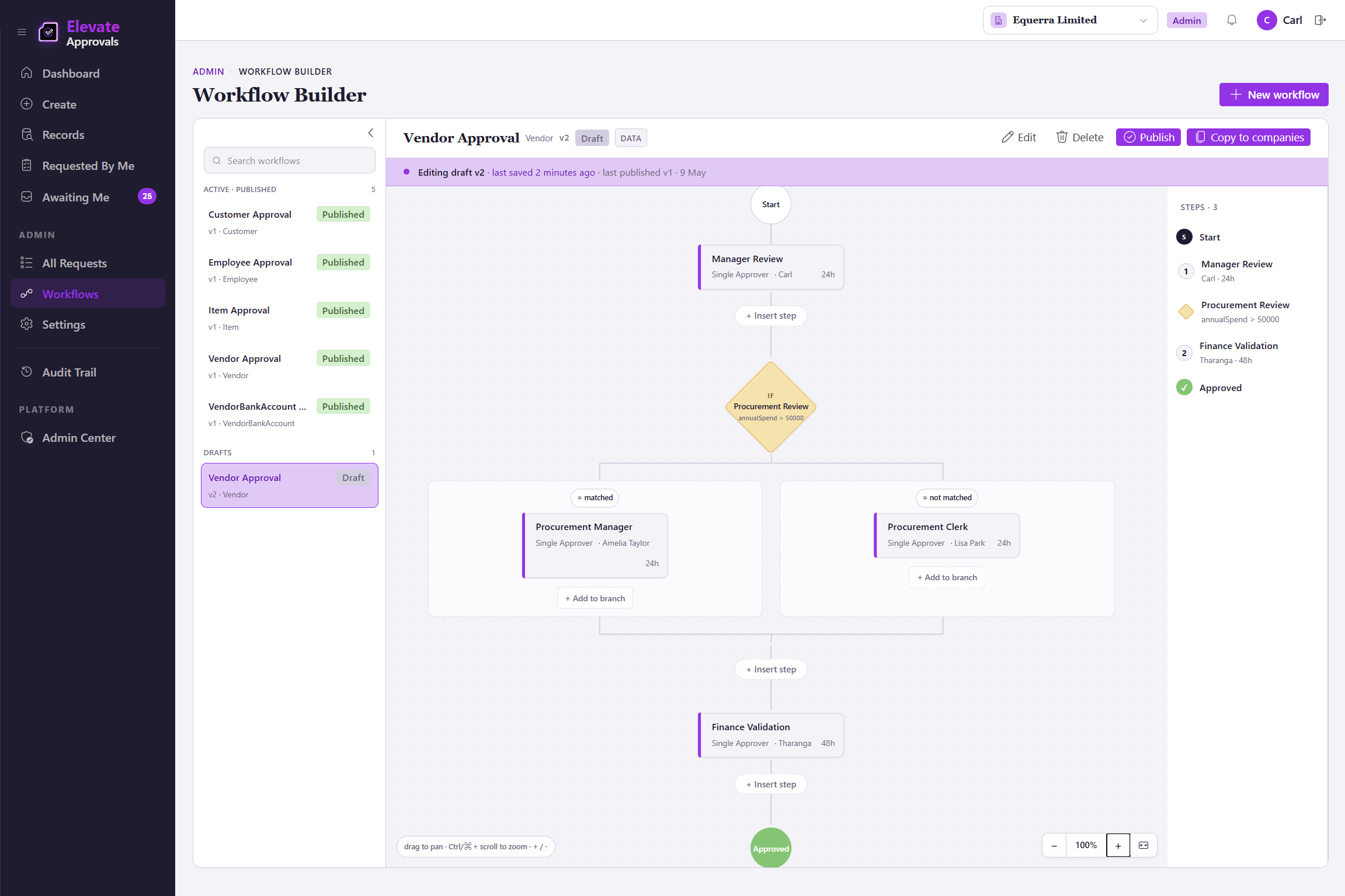
Any ERP with a supplier table
In a typical mid-market ERP (NetSuite, Xero, Sage Intacct, MYOB Acumatica), the vendor bank account is a free-text field on the supplier record. Standard role permissions restrict who can edit it. They do not require a second approver. With Elevate Approvals in front of the ERP, the request to change those fields is captured in a counterparty-facing form, routed to a four-eyes approval workflow that excludes the requester from approving their own change, and only written back to the ERP through REST or webhooks once a second, independent approver signs off.
Business Central with the native extension
In Microsoft Dynamics 365 Business Central, the Vendor Bank Account table holds the bank fields. The native Elevate Approvals extension watches that table. A change to the bank account is paused, captured in the approval engine, and surfaced to a second approver with the original and proposed values side by side. The Business Central record is only updated when the four-eyes step completes. The whole sequence is logged in Elevate Approvals and visible to the auditor in one place.
Three terms you will see across the rest of this guide.
BEC (business email compromise)
BEC is a class of attack where a criminal compromises or impersonates a trusted business email address to redirect payments, credentials, or sensitive data. In vendor-fraud cases, the attacker poses as the supplier and asks finance to update the bank account on file. Reported AU losses last year ran to AUD 84 million.
Four-eyes principle
The four-eyes principle is a workflow-level segregation-of-duties rule: when the person who raised the request is also configured as an approver on that workflow, four-eyes forces the request to a second authorised approver, so the requestor is never the sole signature. Applied to the vendor bank-account change workflow, the rule means the user who raises the change never writes it back to the ERP on their own. The second approver reviews the original and proposed values, signs, and only then does the change land in production.
Segregation of duties
Segregation of duties is the control pattern that prevents one person from completing a sensitive end-to-end process on their own. In supplier fraud, it means the user who edits a vendor bank account is not the user who approves the next payment to that vendor. The roles are configured so that no single account can move a record from open to paid.
Where to go next.
- →Four-eyes on every change that moves money
The applied control: how Elevate Approvals enforces four-eyes on vendor bank-account changes, credit-limit decisions, and any workflow you nominate.
- →Supplier onboarding without the inbox
Capture supplier bank details directly from the supplier through one secure form. No login, no email attachment, no copy-paste.
- →Security and audit posture
Microsoft Entra ID single sign-on, role-based access, database-per-tenant isolation, and the immutable audit trail that ties every change to a named user.